Planning and scheduling
Plans shifts, rotas, crews and appointments around availability, skills, holidays and the rules you set. When someone calls in sick, it finds a replacement and asks before changing anything.
- Reads availability from calendars, your HR tool and holiday lists.
- Applies your rules: rest times, skills, maximum hours, fairness.
- Sends a draft for approval, then publishes it and tells everyone.
- You set the rules and who approves.
- Nothing is published without approval.
Projects and tasks
Keeps track of every project: status, owners, deadlines and open points. It reminds people before things slip and answers “where are we?” in seconds.
- Connects to your project tool, email and chats.
- Keeps a live status per project and per person.
- Chases owners before deadlines and reports blockers.
- Only people on the project see its details.
- Reminders follow your timing and tone.
Approvals and workflows
Routes holiday, expense, purchase and contract requests to the right people with all the context, follows up, and records every decision.
- Recognises the request and checks your limits and policies.
- Sends it to the right approver, with a second approver above limits.
- Records the decision and updates the system of record.
- Your limits and four-eyes rules apply.
- Every decision is in the audit log.
Reports
Builds daily, weekly and monthly reports from your systems and sends them on schedule, in plain language, with the numbers that matter.
- Pulls figures from CRM, ERP, tickets and projects.
- Writes a short summary and highlights what changed.
- Sends it by email or chat at the time you choose.
- Each report goes only to the people you choose.
- Every number links back to its source.
Know
Everything your company knows, available to everyone who may see it, with the source every time.
Internal knowledge chat
Answers any question from your handbooks, contracts, policies, wikis and drives, with the exact source. It respects who may see what.
- Connects to your drives, wiki and document systems.
- Keeps an up-to-date index that follows your permissions.
- Answers with the source, and says when it doesn’t know.
- Answers use only documents the person may see.
- Every answer shows its source.
Onboarding
Guides new employees through their first weeks: tools, rules, people and first tasks, in their language, and checks that nothing is forgotten.
- Builds a plan per role from your checklists.
- Books intro meetings and sends the right documents.
- Answers questions and tells HR when something is missing.
- HR decides the plan for each role.
- Managers see the progress.
HR and IT helpdesk
Answers holiday, payslip and policy questions, fixes common IT issues, and opens a ticket with a clear summary when a person is needed.
- Answers from your HR policies and IT guides.
- Runs safe actions you allow, like password resets.
- Opens and routes tickets with the full context.
- Only the actions you approve are automated.
- HR data stays restricted by role.
Meeting notes
Reads your meeting transcripts, writes the summary, records decisions and turns action items into tasks with owners and dates.
- Reads the transcript from your meeting tool.
- Writes a short summary with decisions and risks.
- Creates tasks and sends the notes to attendees.
- Transcripts only where you allow them.
- Notes go only to attendees.
Serve
One agent for your customers on every channel, in their language, day and night.
Customer service
Answers customers around the clock on your website, WhatsApp and email, in German, French, Italian and English, and hands over to your team with a summary.
- Learns your products, prices, policies and tone.
- Answers, checks orders and books appointments.
- Hands over to a person with the full conversation.
- You decide which topics go to a person.
- Every conversation can be reviewed.
Voice agent
Answers calls on your number, books and moves appointments, takes messages and forwards urgent calls, with a written summary for your team.
- Answers on your existing number or a new one.
- Speaks German, French, Italian and English.
- Books in your calendar, forwards urgent calls, sends a summary.
- You choose when calls go to a person.
- Callers can always ask for a human.
Documents
Reads invoices, contracts, forms and delivery notes, extracts the data, checks it against orders and books it after approval.
- Receives documents by email, upload or scan.
- Extracts the data and checks it against orders and contracts.
- Books it in your system after approval.
- Nothing is booked without approval.
- Mismatches are flagged, never guessed.
Sales
Qualifies leads from your website and email, drafts proposals and follow-ups, and keeps your CRM up to date without anyone typing.
- Asks the right questions and qualifies the lead.
- Drafts the offer from your templates and prices.
- Logs everything in the CRM and reminds your sales team.
- Offers are sent only after your review.
- Your prices and discount rules apply.
Your phone line, answered.
Every call is picked up, understood and finished: booked, answered or passed to the right person. Your team reads the result instead of listening back.
- 0:00Anna Frei
Grüezi, unsere Heizung macht seit gestern komische Geräusche.
- 0:22nodest
Das schauen wir an. Läuft die Anlage noch, oder ist sie ganz aus?
- 0:48Anna Frei
Sie läuft, aber es klopft ziemlich laut.
- 1:07nodest
Dann ist es kein Notfall. Luca hätte am Donnerstag um 9 Uhr Zeit. Passt das?
- 1:40Anna Frei
Ja, perfekt.
- 1:52nodest
Gebucht. Sie bekommen gleich eine SMS mit allen Angaben.
- Day and night including weekends and holidays
- German, French, Italian, English and Swiss German
- Urgent calls go straight to your on-call technician
- Your rules decide what it books and what it forwards
Desktop
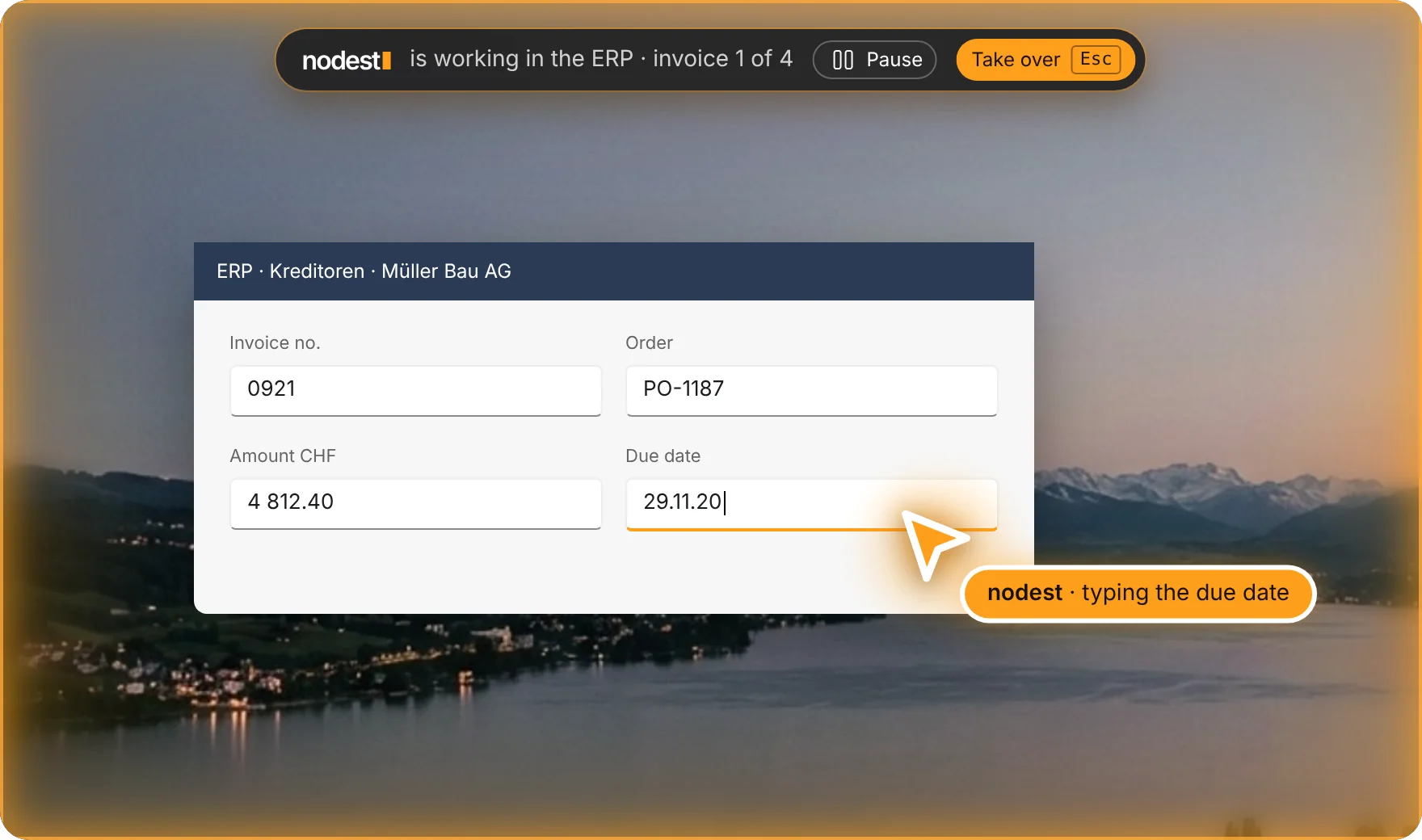
Where there’s no integration, the agent uses the computer itself. It opens your programs, clicks, types and saves, like someone on your team.
Runs on
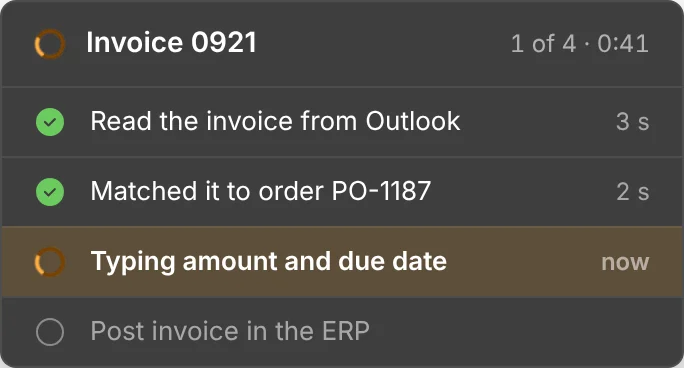
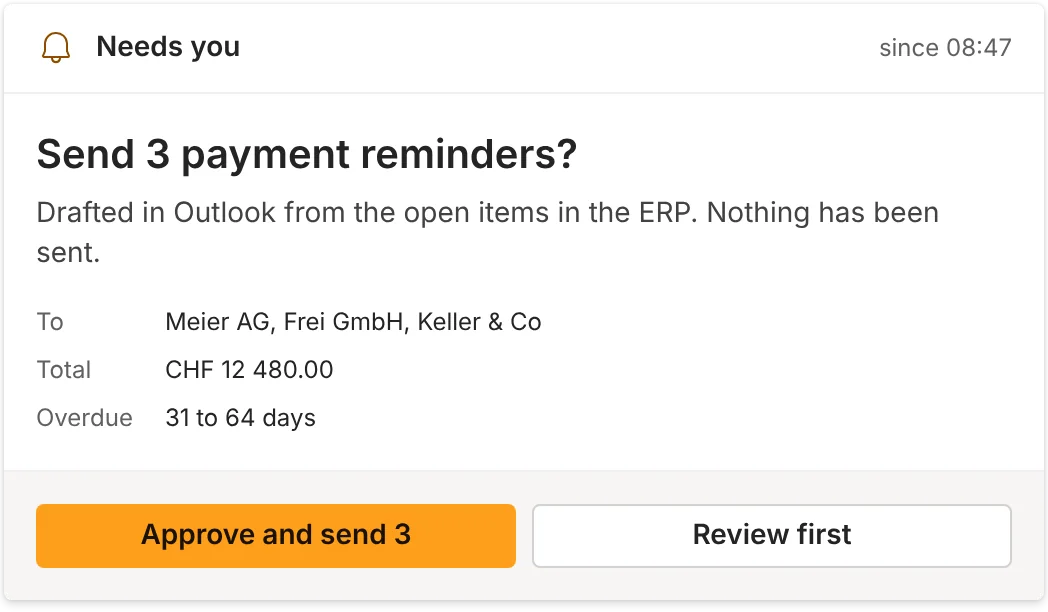
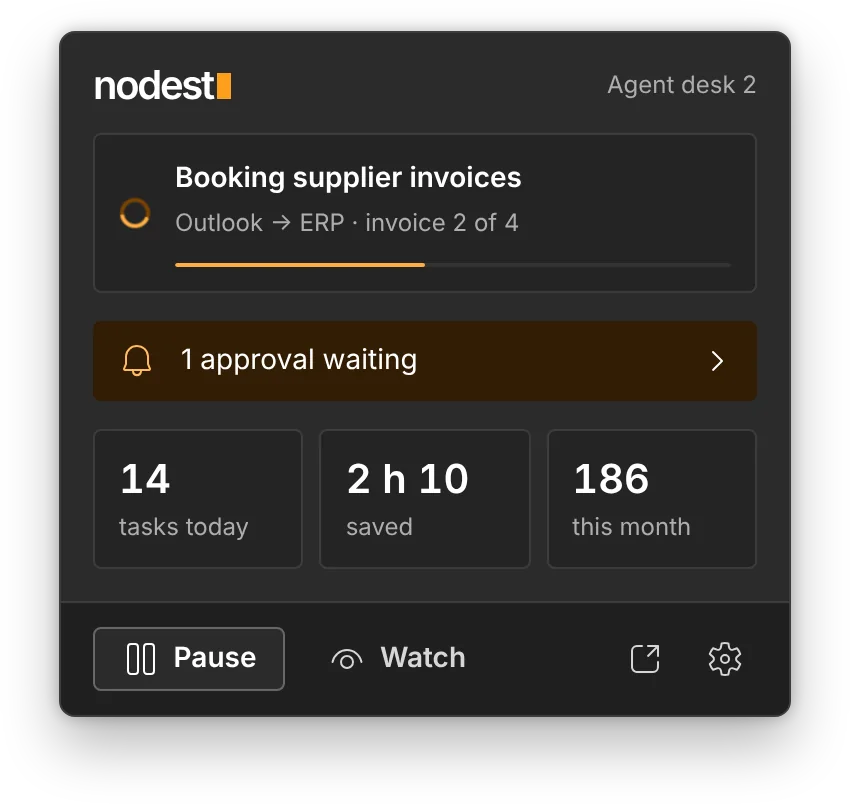
What you see while nodest works.
The agent uses your computer in plain sight. An overview of the Nodest experience on Windows.
Answers email in Outlook
Reads the supplier email, checks the PDF and replies in your tone.
Books it in your ERP
Opens the ERP like your team does and fills in every field. No integration needed.
Asks a person to approve
Payments and anything risky wait for a yes in Teams. Every step is recorded.
What it does on a computer
If a person can do it with a mouse and keyboard, the agent can learn it. A few examples from Swiss companies:
Enters data in your ERP
Books invoices, orders and timesheets in Abacus, Bexio, SAP or whatever you run, field by field.
Example: 60 supplier invoices a week, booked the same dayWorks in web portals
Logs in to supplier, bank, insurance and government portals, downloads statements and uploads forms.
Example: monthly statements from 14 supplier portalsSorts and files documents
Renames scans and attachments, puts them in the right folder and keeps your file structure clean.
Example: every incoming PDF filed by supplier and monthBuilds reports in Excel
Pulls the numbers from several places, updates the sheet and the chart, and sends it every Monday.
Example: the weekly sales report, ready at 7:00Uses old software without an API
The order system from 2009 that nobody can connect to. The agent simply uses it like your team does.
Example: web shop orders typed into the old order systemChecks and reconciles
Compares two systems line by line, fixes what is clear and sends the rest to the right person.
Example: bank against accounting, every morning- Copy data between email, Excel and ERP
- Fill in forms and applications
- Create quotes and order confirmations
- Update CRM records after calls
- Book holidays and absences in HR software
- Check delivery notes against orders
- Download and file bank statements
- Send payment reminders
- Export data and build lists
- Register new customers and suppliers
- Plan routes and tours
- Archive emails and documents
Every run is recorded
You see what the agent did, when, and why. Open any run and watch it step by step.
How we hand over a process
You don’t set anything up. We do it with you in about two weeks.
- 01Show us once
You do the task once while we record the screen and ask questions. Thirty minutes is usually enough.
Recording · 04:12 - 02We build and test it
We turn it into a process, test it on real cases and handle the exceptions you told us about.
20 / 20 test runs passed - 03It runs on its own computer
A virtual computer in a Swiss data centre, with only the apps and folders it needs.
Desktop 01 · Zürich · Running - 04You check, we improve
Every run is recorded. We review errors every week and update the process when your software changes.
▶ Replay run 09:14
Safe by design
- Only the apps you allowAccess is set per app, folder and website. Everything else is blocked.
- Approval before it mattersPayments, emails to customers and deletions wait for a person.
- Stop with one clickA bar shows when the agent is in control. Anyone on your team can stop it.
- Passwords stay in a vaultLogins are stored encrypted and never shown in logs or screenshots.
- Every action recordedScreenshots and a log of every click and keystroke, kept for audits.
- Hosted in SwitzerlandThe desktop runs in a Swiss data centre, separated per customer.
Integration first, screen second
If your software has an integration, the agent uses it. That’s faster and cheaper. The screen is for everything that has none, so no task is left out.
We automate everything your company repeats.
Every automation is a simple rule: when something happens, the agent does the work and a person approves where it matters. Here are the ones companies start with. We build any other you need.
Something your team does every week that isn’t listed? We build it as part of your plan.
We build your agent. You don’t set up anything.
No prompts to write, no workflows to configure, no new software to learn. You tell us how the work is done. We do everything else.

- Week 1Free audit and workshopWe map where your team loses time and pick the first capabilities.
- Week 1–2Connect your tools and documentsMicrosoft 365 or Google, CRM, ERP, drives, phone. We handle it with your IT.
- Week 2–3Write playbooks and rulesYour processes, limits, tone and who approves what.
- Week 3Test with your teamReal questions from your people. We fix every gap before go-live.
- Week 4Go live on your channelsTeams, WhatsApp, email, phone and website. Short training for staff.
- Every monthReview and improveQuality review, new knowledge, new capabilities, a results report.
Your IT only grants access. We guide them step by step.
Not another tool your team has to set up.
Chatbots answer customers. Automation tools run fixed rules. nodest is one agent that knows your company and does the work, set up and run by us.
| Feature | nodestYour company agent | Intercom FinSupport chatbot | ZapierWorkflow automation | Custom projectBuilt from scratch |
|---|---|---|---|---|
| Knows your company | Documents, rules and systems, with sources | Your help-centre content | No, follows set rules | Yes |
| Internal work: planning, approvals, HR and IT | Included | No, customer-facing | Only workflows you build | If you pay for it |
| Customers on web, WhatsApp, email and phone | One agent on every channel | Yes, support channels | Through connectors | Built per channel |
| Hosting and data | Switzerland, Swiss DPA | Provider cloud (US, EU or AU) | Provider cloud (US) | Your choice |
| Setup and improvement | Done by us, reviewed monthly | Your team | Your team | Separate contract |
| Time to go live | 2–4 weeks | Days to weeks | Per workflow | Months |
| Price | From CHF 390 / month, whole company | USD 0.99 per resolution, plus seats | From USD 19.99 / month, by tasks | CHF 25’000+ upfront |
Competitor information from public pricing pages and reviews, October 2026. Product names and logos belong to their owners and are shown for comparison only.
Connected to the systems you already pay for.
We connect your agent during setup. If a system isn’t listed, we connect it through its API, a database or a file export.
Communication
Calendars and files
CRM, sales and commerce
ERP and finance
Service, IT and projects
Your own systems
Product names and logos belong to their owners. Listed systems are ones we connect; we are not endorsed by them.
Every capability runs under the same controls.
You decide what the agent can see, what it can do on its own, and what always waits for a person.
Data residency
Hosting in Switzerland or the EU, or in your own Azure, AWS or Google cloud.
Encryption
TLS in transit and AES-256 at rest for documents, indexes and logs.
Single sign-on
Microsoft Entra ID or Google Workspace, with multi-factor login.
Role-based access
Permissions follow your directory. Nobody sees through the agent what they can’t see today.
Full audit log
Every question, answer, source and action, with user, time and channel, exportable.
Human approval
Payments, bookings, contracts and anything you choose wait for a person.
Client isolation
A dedicated instance per company. No shared index, no shared memory.
Contracts
Data processing agreement under the Swiss FADP and the GDPR. Your data is never used to train models.